
Form
Collects several typed answers one question at a time, with validation, retries, review and cancellation, then continues on submit, cancel or failure.
The Form node asks a series of questions one at a time and collects the answers as one unit. Each question is a typed field (text, number, date, choice, file and so on) that Buni.ai checks before moving on. While the form is running, every reply is treated as an answer, a correction or a form command, never as a new intent. When the form finishes, the answers are stored under one name and the flow continues along submit, cancel or failure.
Runs in chatbot projects only
Form appears in the Automation palette too, but the automation engine does not run it: a Form node in an automation is passed over and the payload continues to the next node unchanged. To collect input in an automation, use a hosted form or the Form Trigger.
When to use it
- You need several related answers in a fixed order, such as a produce order, a support ticket or a registration.
- You want each answer checked for you (a real date, a number in range, one of your options) with a retry when it is wrong.
- You want the person to review everything before it is submitted, and to be able to go back, skip or cancel.
- To pick up one or two details from a single message, use the parameters of an Intent node instead. Every reply to an intent's question is still classified against all your intents, so a one-word answer can be mistaken for a new request. A Form keeps the conversation on its questions.
Settings
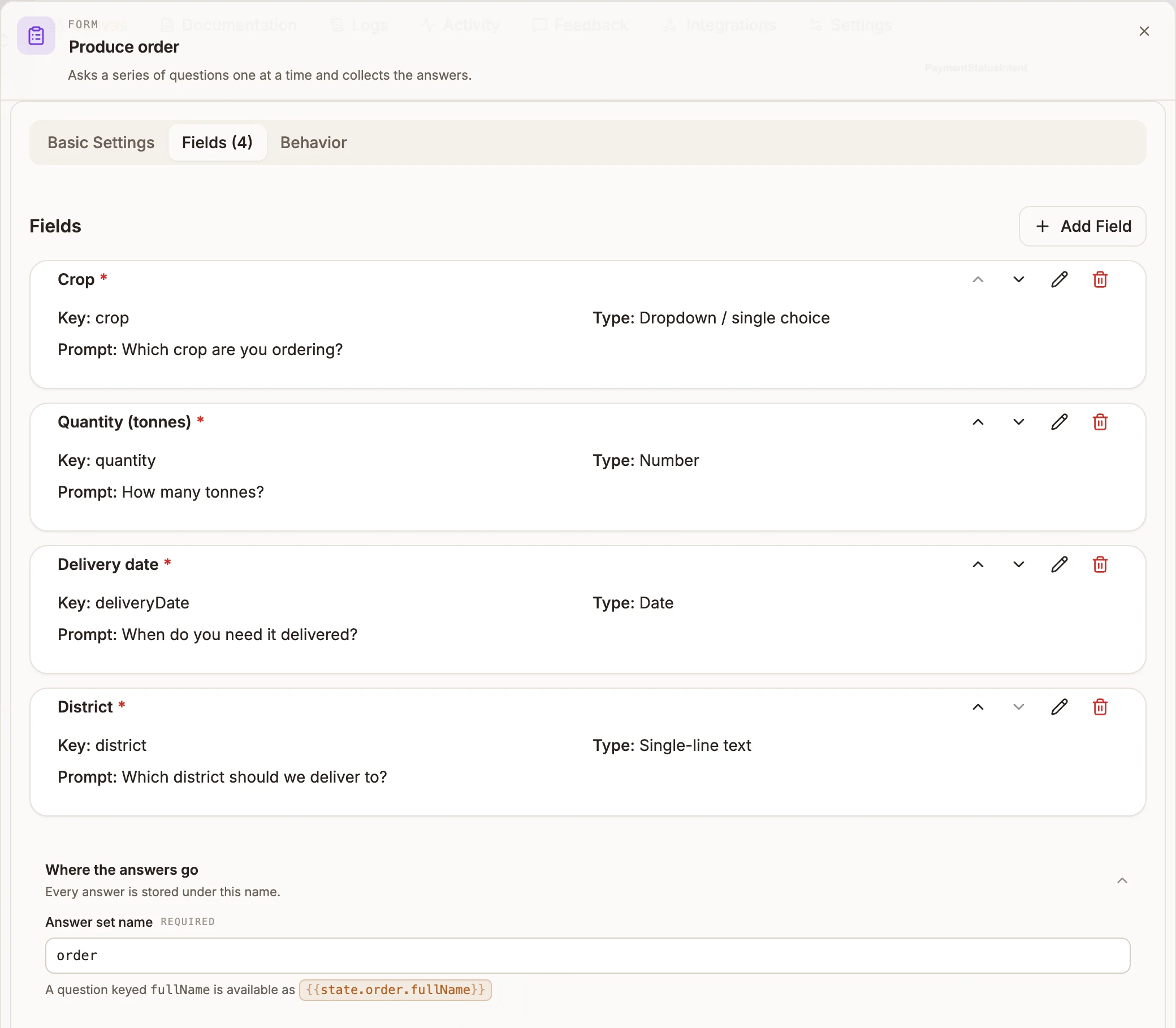
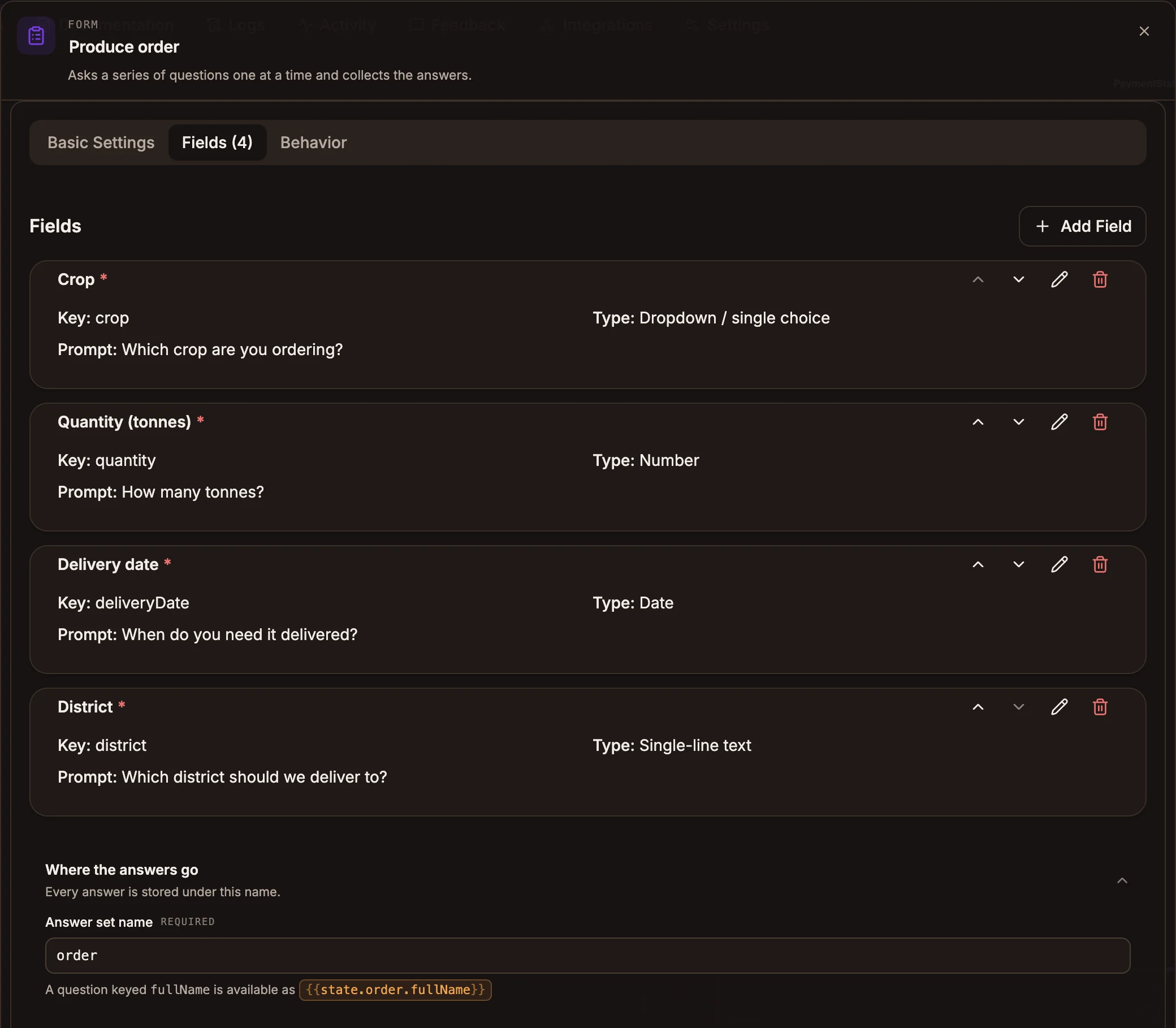
The panel has three tabs, a field editor that opens when you add or edit a field, and a Where the answers go section below the tabs.
Basic Settings
Prop
Type
Fields
The Fields tab shows the count in its title, for example Fields (4). Click Add Field to open the field editor. Each field card has buttons to move it up or down, edit it and delete it. Fields are asked in list order.
Prop
Type
Click Save Field to add the field to the list.
Field types
| Field Type | What the person can send | Stored as |
|---|---|---|
| Single-line text, Multi-line text | Any non-empty text | The text, trimmed |
| Number | A number; commas are ignored, so 1,500 works | A number |
| Phone number | 7 to 15 digits, with an optional leading +; spaces, dashes, dots and brackets are removed | Digits with a leading + |
An address in the form name@example.com | The address in lower case | |
| Dropdown / single choice | The option's label, its position in the list (2), or a sentence that names exactly one option, such as "I'd like the maize please" | The option's id |
| Checkboxes / multiple choice | Labels or positions separated by commas, semicolons or "and" | A list of option ids |
| Yes / no confirmation | yes, y, yeah, yep, sure, confirm, true, 1 / no, n, nope, nah, false, 0 | true or false |
| Date | 2026-07-18, 18/07/2026 (day first), 18 July 2026, July 18, 2026, today, tomorrow | 2026-07-18 |
| Time | 3pm, 3:30 pm, 15:00 | 15:00 |
| Date and time | A date and a time joined by "at" or a comma, such as 18 July 2026 at 3pm | 2026-07-18T15:00 |
| Location | A shared location pin, lat, lng coordinates, or a place name | lat and lng, or text for a place name |
| File or image | An attachment of an accepted type | The stored file's key, mimeType and sizeBytes |
| Hidden / prefilled value | Never asked | Its prefilled value |
"today" and "tomorrow" are worked out in UTC.
Behavior
Prop
Type
Where the answers go
Prop
Type
The node shows a warning icon until it has at least one field and an Answer set name.
Outputs
| Handle | When it is taken |
|---|---|
| submit | Every required field is answered and, with Confirmation on, the person replied "yes" to the review. |
| cancel | The person cancelled, or an allowed intent interrupted the form with On Interruption set to Cancel the form. |
| failure | A required field ran out of retries. |
On all three paths the answers collected so far are written to state.<Answer set name>, keyed by field key. With an Answer set name of order, a field keyed quantity is at {{state.order.quantity}}. The next node also receives the answers as its input.
If saving the submission fails, the person is told "Sorry, something went wrong submitting your information. Please try again." and no handle is taken.
If a handle is not connected, the person gets a default message instead: "Thanks! Your submission has been received." on submit, "OK, cancelled." on cancel, and "Sorry, something went wrong with that form." on failure.
What the person can say during a form
| Message | Effect |
|---|---|
back, go back, previous | Clears the last answer and asks that question again |
skip, pass, n/a, none | Skips the current question if it is optional |
help, ? | Repeats the current question |
review, summary | Shows the review summary, once every required question is answered |
change <field> | Asks one question again; use the field's key or label |
restart, start over | Starts the form again from the first question |
cancel and the other cancel words | Cancels, if Allow Cancellation is on |
A single message can answer several questions at once. For example, "3 tonnes of maize for Kigali on 2026-07-20" can fill quantity, crop, district and date together. Each extracted value is checked by the same rules as a direct answer, and sensitive fields are never filled this way.
Retries
A wrong answer gets the reason it was rejected followed by the Retry Prompt (or the prompt again). A required field allows 3 retries; after that the form ends with "I'm having trouble collecting" followed by the field's label, and takes failure. An optional field allows 1 retry and is then skipped.
Example
A produce-ordering bot collects an order and saves it.
-
An Intent node named
PlaceOrderconnects to a Form node with Answer set nameorderand these fields:Field Key Field Type Prompt Options or range cropDropdown / single choice Which crop are you ordering? Maize, Beans, Rice quantityNumber How many tonnes? Minimum 1, Maximum 50 deliveryDateDate When do you need it delivered? districtSingle-line text Which district should we deliver to? -
submit connects to an API node that posts the order, with a body that uses
{{state.order.quantity}}and{{state.order.deliveryDate}}, followed by a Reply. -
cancel connects to a Reply: "No problem. Message us any time to start a new order."
-
failure connects to a Live Chat node so a person can finish the order.
On WhatsApp, the crop question arrives with three reply buttons. The review summary lists the four answers before the order is sent.
Channel behaviour
- Buttons. A Yes / no confirmation field is sent with Yes and No buttons. A Dropdown / single choice field is sent with one button per option when the channel allows that many: WhatsApp, Messenger and Instagram up to 3, Slack 5, Telegram 8, web chat 10. Button titles are cut to the channel's limit (20 characters on WhatsApp). With more options than that, only the prompt text is sent, so list the options in your prompt.
- WhatsApp Flows. When the project has WhatsApp credentials with a WhatsApp Business Account ID, publishing creates a WhatsApp Flow for each Form node. The form then opens as a native WhatsApp form with an Open Form button. Time, date-and-time and location fields appear as text boxes in the Flow, file fields as a photo picker, and hidden fields are left out. If creating the Flow fails, the form runs as questions and answers.
- Telegram. The form opens in a Telegram Mini App from an Open Form button.
- Every other channel runs the form as questions and answers. Answers are checked the same way on every path.
WhatsApp Flows need a republish
The Flow is created when you publish. After you change a form's fields, publish again so the WhatsApp Flow matches.
Tips and limits
- Choice answers are option ids. A choice field stores the option's id, which the panel generates (for example
opt_k3j9x2a), not its label. Branch on it with care, or use a text field when a later node needs the words. - Prompts are plain text. Variables such as
{{state.name}}in a prompt or option label are sent literally, not filled in. - A question releases the form. If the current field is a choice and the person sends a question that ends in "?" and names none of the options, the form is paused and the question goes to the rest of your bot. They send
resumeorcontinueto carry on. - Suspended forms (from an interruption set to Suspend the form) resume the same way, at the question they left.
- Republishing mid-form. If you change a form's fields and republish while someone is part-way through, their form restarts with "This form was updated, so let's start fresh."
- Files are scanned. Uploaded files are checked before the form submits; if a check is still running, the person is asked to reply "yes" again in a few seconds.
- Not in the panel. Help text, conditional visibility, per-field retry counts, text patterns and length limits, option synonyms and the file size limit exist in the form format but cannot be set in the panel. Hidden / prefilled value fields have no value box, so one added in the panel stays empty.
- Limits. Up to 30 fields per form and 20 Form nodes per project. The whole form definition travels with every conversation turn, so smaller forms keep every message lighter.