
Collect Input
Asks the caller for keypad digits or speech and saves the answer in a variable for later nodes to use.
Collect Input asks the caller a question, listens for their answer on the keypad (or by voice, where your carrier supports it), and saves it in a variable. Later nodes read it with {{state.accountNumber}} or whatever name you chose.
IVR projects only
Collect Input appears only in the palette of an IVR project.
When to use it
- Capture an account number, meter number, PIN, amount or date of birth.
- Take a spoken answer, such as a name or a short reason for calling, on a carrier with speech recognition.
- To offer a fixed set of choices ("press 1 for sales"), use Menu (voice) instead. It gives each key its own path.
- To check a one-time code sent by text, use Verify Caller.
Settings
Question
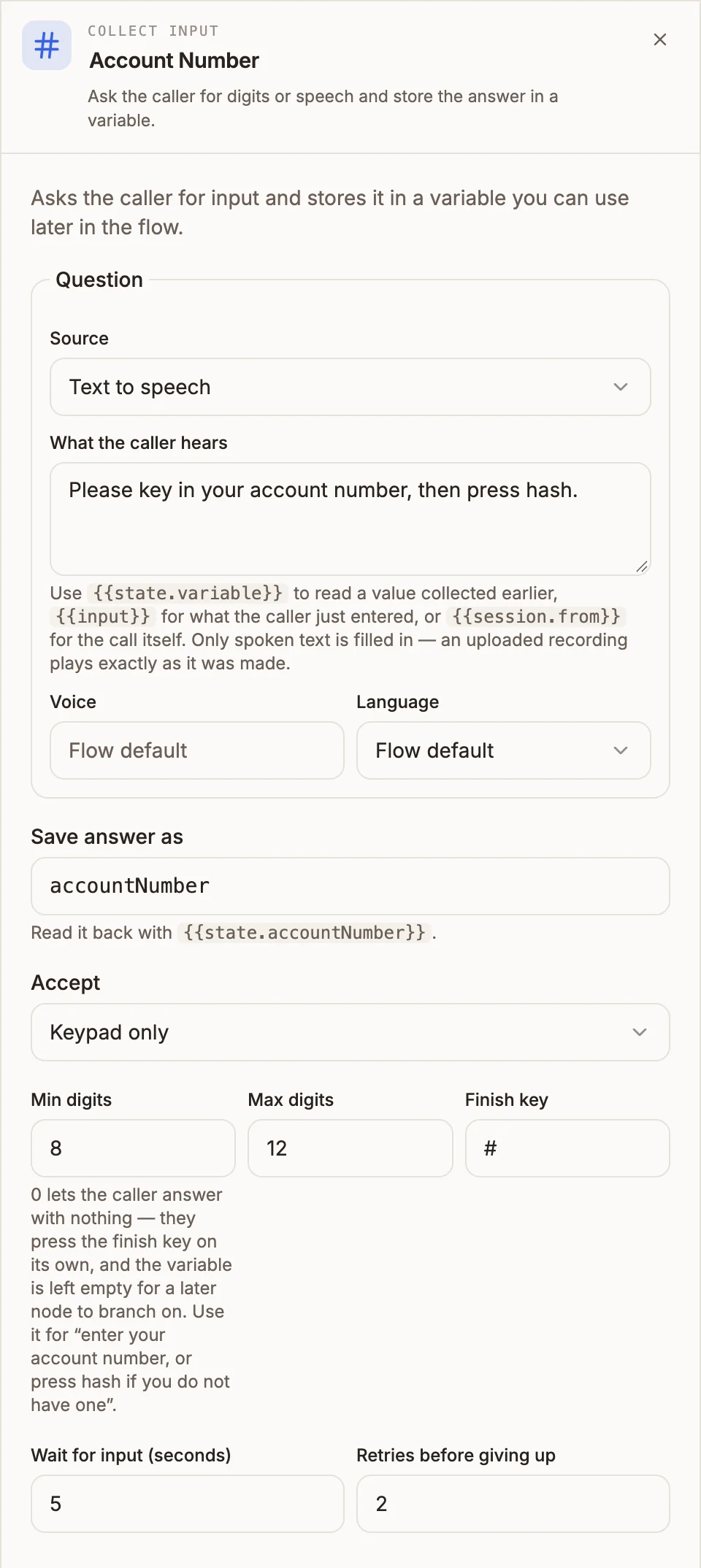
What the caller hears. It has the standard voice prompt fields: Source (Text to speech, Uploaded audio or Audio URL), What the caller hears, Voice and Language for text to speech, Audio for an uploaded file, and Audio URL for a hosted one. See Play Message for the details of each.
Answer
Prop
Type
Outputs
| Handle | When it is taken |
|---|---|
| answered | The caller gave a usable answer. It is saved in the variable before the flow moves on. |
| invalid | The retries ran out and the last attempt was a keypad answer shorter than Min digits. |
| no input | The retries ran out and the last attempt was silence. |
On each retry the question is asked again. With the default of 2 retries, the caller gets three attempts in total.
The node writes one variable: the name in Save answer as, holding the digits pressed or the text of what the caller said. With Min digits set to 0 and only the finish key pressed, the variable is saved empty, so a later Router can branch on it.
Example
Capture an account number, confirm it, then look it up:
Collect Input ("Please key in your account number, then press hash.")  → Save answer as: accountNumber
  ├─ answered ─→ Menu ("I have {{state.accountNumber}}. If that is right, press 1. To try again, press 2.")
  │                ├─ 1 ─→ API (look up the account)
  │                └─ 2 ─→ back to Collect Input
  ├─ invalid ──→ Play Message ("That number is too short.") → Transfer (support)
  └─ no input ─→ End Call ("Sorry, I did not hear anything. Goodbye.")
For "enter your account number, or press hash if you do not have one", set Min digits to 0 and follow the node with a Router that checks whether {{state.accountNumber}} is empty.
Tips and limits
- Publishing is blocked when the question is empty, Save answer as is empty or not a usable name, Min digits is greater than Max digits, or nothing is connected to the node.
- Speech depends on the carrier. Africa's Talking has no speech recognition. On a carrier without it, Keypad or speech falls back to keypad only, and the canvas warns you before you publish. See Voice carriers.
- Some carriers ignore keys pressed during the question. On Infobip, callers must wait for the prompt to finish before keying in. Keep the question short.
- Confirm before acting. Read the answer back and let the caller correct it. Mistyped account numbers are common on a phone keypad.
- Digits are masked in records. Runs of five or more digits are masked in the call transcript, keeping only the last two. The value in the variable is not masked, so avoid copying it into text you log elsewhere.
- For anything account-specific, put Verify Caller in front.