
Form Trigger
Publishes a hosted web form and starts the automation each time someone submits it. Answers land in state under the output variable.
The Form Trigger turns a set of fields into a public web page. Anyone with the link can fill it in, and each valid submission starts a run of your automation with the answers in state. It uses the same field types as the conversational Form node, but it starts a run instead of collecting answers inside a chat.
Where you find it
Drag Form Trigger from the Triggers group of the automation palette, or open the automation's Trigger node and select the Form card on the Trigger Settings tab. The form settings below are the same in both places.
When to use it
- You collect requests from people who are not chatting with your bot, such as sign-ups, intake forms or surveys.
- You want a link you can email, print as a QR code or put on a website to start a workflow.
- You want the form answers validated before any node runs.
To collect answers inside a WhatsApp or web chat, use the Form node. To start a run from your own system with a JSON payload, use a webhook trigger; see Automation triggers.
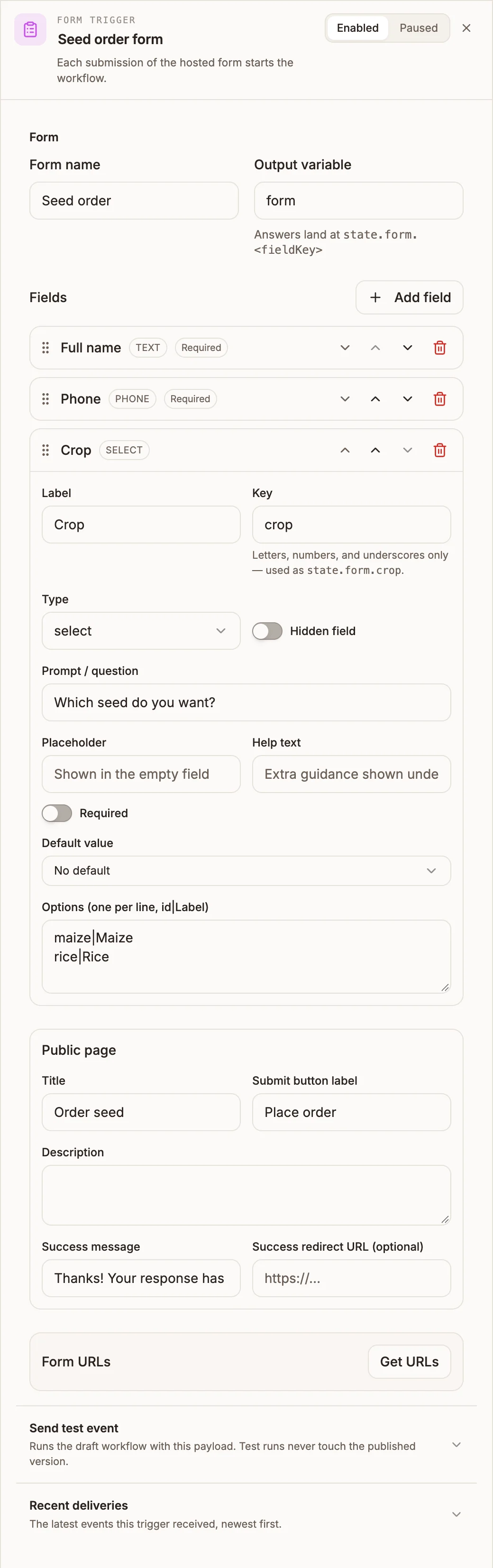
Settings
When you add it from the palette's Triggers group, the panel header also has an Enabled / Paused switch, and a paused trigger shows Paused on its canvas card.
Form
Prop
Type
Each field
Click a field row to expand it.
Prop
Type
A field with a problem, such as a required hidden field with no default, shows a warning icon on its row and on the Form section.
Public page
Prop
Type
Form URLs
Click Get URLs to create the links. The button then reads Refresh URLs.
| URL | Runs | Available |
|---|---|---|
| Test URL | Your draft flow, as a dry run | While you build |
| Production URL | Your published flow | Only after you publish the project. Before that, the page says the form is not published yet. |
Both use a readable address built from the form name, such as /automation/seat-request/form, and the Test URL adds ?test=1. Renaming the form does not change the URL, so links you have shared keep working. If you want the URL to match a new name, click Update URL to match name. The old link then returns a 404 for anyone who has it.
Added from the Triggers group, the panel also has Send test event, which runs the draft workflow with a Sample payload, and Recent deliveries, which lists the latest events the trigger received.
Outputs
The Form Trigger has one output handle. When a submission passes validation, the run starts there with:
| Variable | Contains |
|---|---|
{{state.form.fieldKey}} | Each answer, under your Output variable (default form). |
{{state.formSubmission}} | The whole submission: formId, variableName, answers, submittedAt and mode (TEST or PROD). |
{{state.trigger.type}} | FORM, so shared nodes can tell a form run apart from other triggers. |
Example
A seed co-operative takes orders from a printed QR code:
Form Trigger (Form name: Seed order
              Fields: full_name (text, required), phone (phone, required),
                      crop (select: maize|Maize, rice|Rice), bags (number, Min 1))
  → Data Store (insert order: {{state.form.full_name}}, {{state.form.crop}}, {{state.form.bags}})
  → Messaging (SMS to {{state.form.phone}}: "We have your order for {{state.form.bags}} bags.")
Tips and limits
- Answers are validated in the browser and again on the server, so a submission cannot skip your rules.
- File fields upload straight to storage from the browser. Each file must pass a malware scan before the run starts. While a scan is still running, the visitor sees "Your upload is still being scanned. Please try again shortly."
- File uploads are limited to 10 MB each, and the answers themselves to 256 KB.
- The page includes a hidden spam trap. Submissions that fill it are accepted silently and start no run.
- Share only the Production URL. Test URL runs are dry runs against your draft.
- The public page reads the fields from your saved canvas, so a field change shows on the Production URL as soon as you save, while submissions still run the published workflow. Republish after changing fields so the form and the workflow agree.