
Run workflow
Runs one of your organisation's shared workflows, waits for its answer and saves it, then continues on Success or Failure.
Run workflow runs a shared workflow: an automation in your organisation that other projects run and get an answer from. The step passes the workflow its inputs, waits for its answer, saves it, and continues on Success or Failure.
When to use it
- Several projects need the same steps, such as looking up a customer in your CRM or getting an access token. Build them once as a shared workflow and run it wherever it's needed.
- To reuse steps that should be copied into each project and pinned to a version, use a Subworkflow instead. A Run workflow step always runs the shared workflow's current live version.
- For a single HTTP call, the API node is simpler.
Where you find it
Run workflow is in the Logic group of the palette in USSD, chatbot and automation projects, and in subworkflows. Voice projects can't run shared workflows yet.
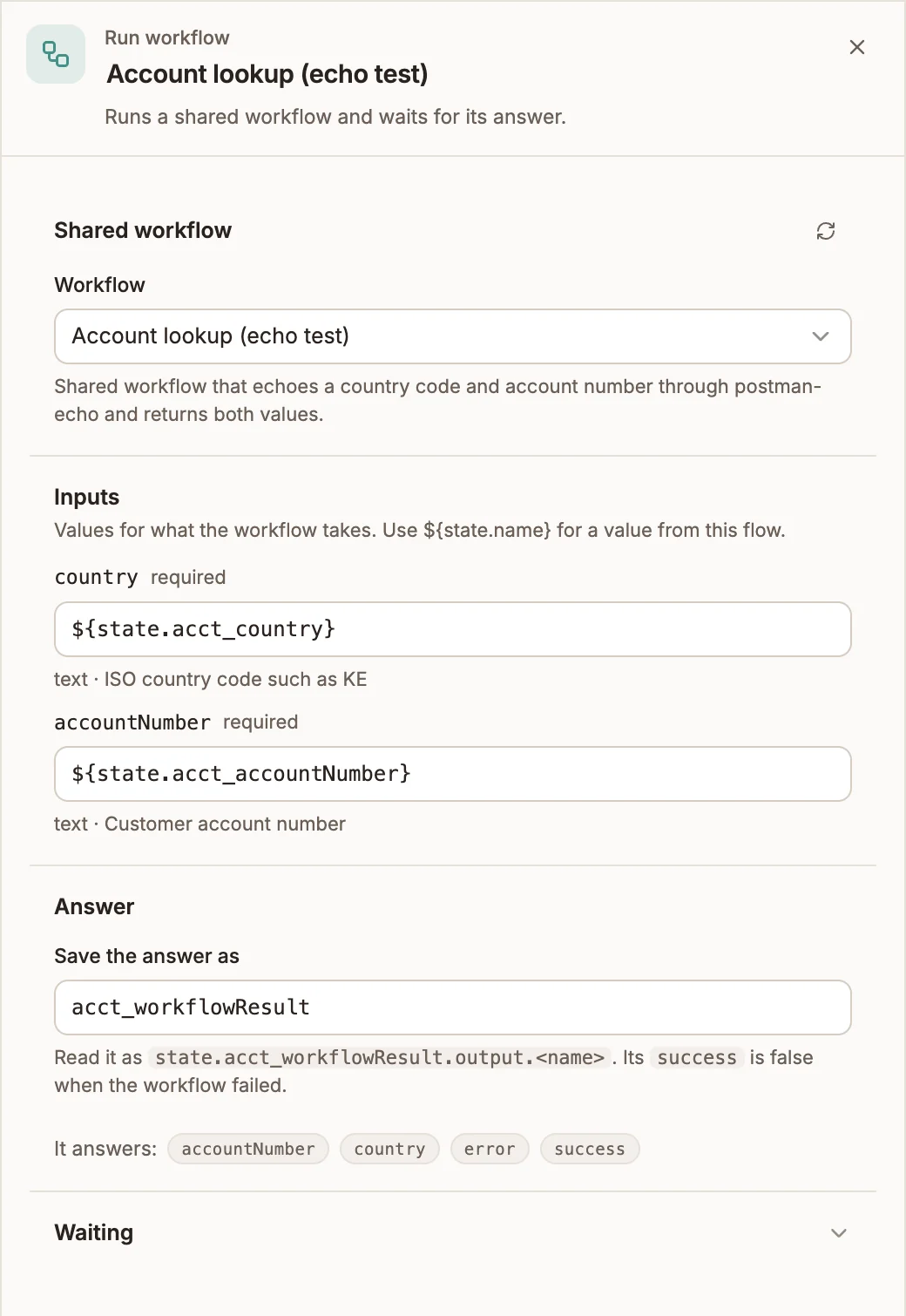
Settings
Prop
Type
When the workflow stops taking an input, the step lists it under No longer taken: with a button to remove it.
How long it waits
| Project type | Default | Longest |
|---|---|---|
| USSD | 3 seconds | 4.5 seconds |
| Chatbot | 8 seconds | 20 seconds |
| Automation | 20 seconds | 120 seconds |
A step that runs out of time takes Failure and is not retried.
Outputs
| Handle | When |
|---|---|
| Success | The shared workflow answered. Also taken when it ends without reaching a Return step, with an empty output. |
| Failure | The shared workflow failed, timed out or could not be reached. |
The answer is saved as:
{
  "success": true,
  "output": { "clientId": "C-1042" },
  "error": null,
  "cached": false
}
output holds what the workflow's Return step answers. When success is false, error has a code and a message:
| Code | When |
|---|---|
TIMEOUT | The workflow did not answer within the wait. |
UNAVAILABLE | The workflow could not be reached. |
BAD_INPUT | The inputs are not what the workflow takes, for example a required input is missing. |
NOT_PUBLISHED | The workflow has no live version. Publish it, then publish this project again. |
NOT_CONFIGURED | The workflow isn't ready, or isn't available to this project any more. The message says what to do. |
WORKFLOW_ERROR | The workflow itself failed. The message is the workflow's own. |
cached is true when the answer came from a saved result.
When Failure isn't connected
- USSD: the session ends on the error screen. The canvas warns No Failure Path.
- Chatbot: the turn stops.
- Automation: the run fails with the workflow's error.
Example
A USSD project asks for an account number, runs the shared workflow Find client and greets the client by name:
- Menu, asking
Enter your account number:, Output variableaccountNumber. - Run workflow, Workflow Find client, input
accountNumberset to{{state.accountNumber}}, Save the answer asclient. - On Success, a Menu showing
Welcome, {{state.client.output.firstName}}. - On Failure, a Menu showing
We couldn't find that account. Please try again later.
Tips and limits
- A draft runs the draft. In the simulator, the step runs the shared workflow's saved draft. A published project runs its live version, so publishing a new version of the workflow changes what published projects run, without republishing them.
- Publishing checks the step. A project can't be published while a step runs a workflow that isn't live, or leaves out an input the live version requires.
- Keep USSD calls fast. A USSD session has only a few seconds per screen, so the wait is capped at 4.5 seconds.
- Shared workflows can run each other at most 3 deep, and a workflow can't run one that is already running further up the chain.
- Buni can add the step. When your organisation has shared workflows, the AI assistant can add a Run workflow step for one of them, with its inputs and both paths.