
Respond Webhook
Ends an automation with a status code, headers and body of your choosing, returned to whoever called its webhook or the Trigger API.
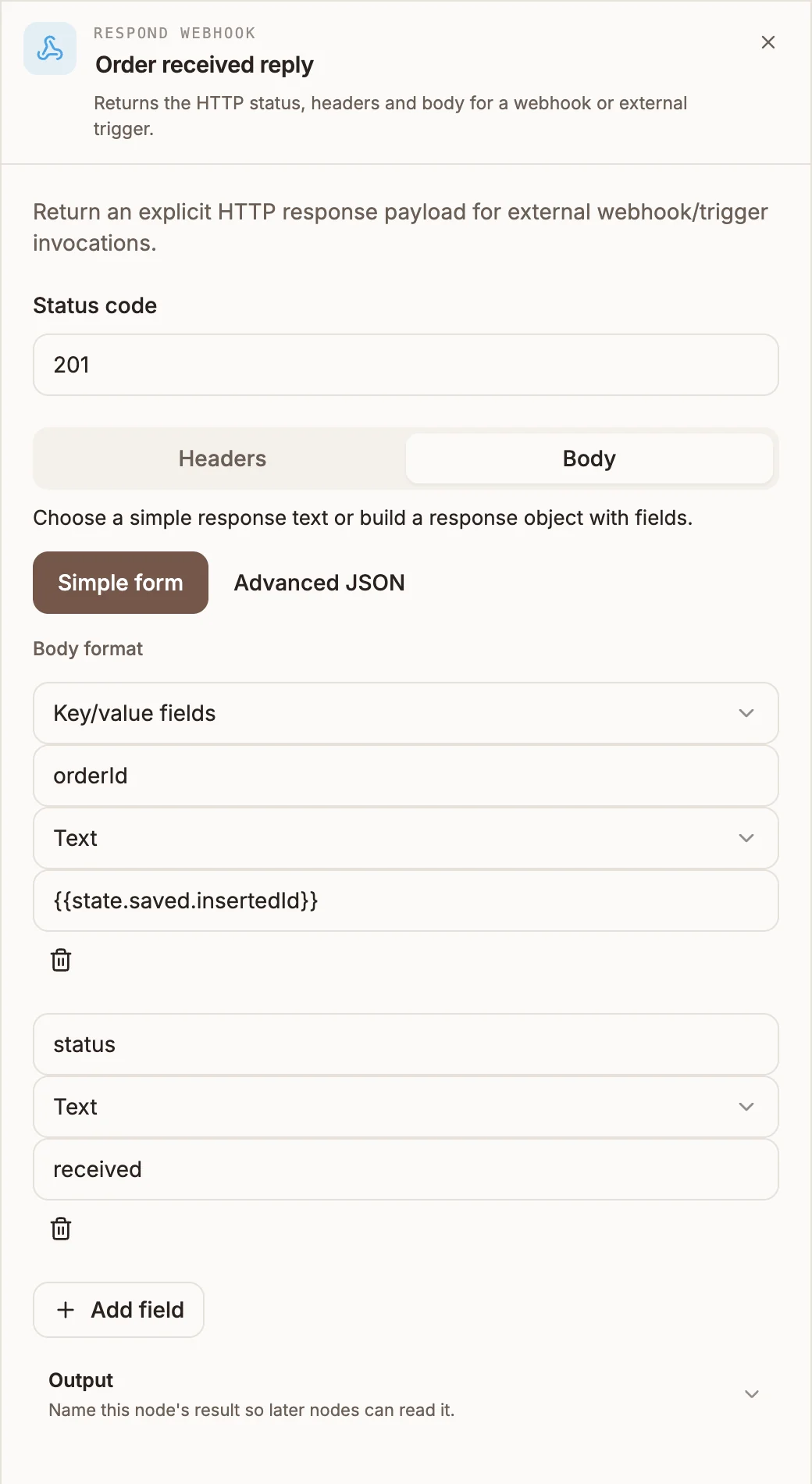
Respond Webhook is the last step of an automation that was called over HTTP. It builds a response, a status code, headers and a body, from the run's data and returns it as the result of the run, so the system that called your webhook gets a useful answer instead of the default one.
When to use it
- Return the ID of the record the automation just created.
- Tell the caller whether the request was accepted, with a status and a message.
- Answer a partner system in the exact JSON shape it expects.
- To call another system from the middle of a flow, use the API node instead.
Built for automations
The node appears in the USSD and chatbot palettes, but only automations are called in a way that makes use of the response. The USSD runtime has no implementation for it, and in a chatbot it ends the flow without sending the user anything.
Settings
Prop
Type
Values anywhere in the node can use variables, for example {{state.orderId}} in a body field, or { "id": "{{state.record.insertedId}}" } in Advanced JSON.
The generic Output section in the panel is not used: the response is always saved to {{state.webhookResponse}}.
Outputs
None that run. The automation ends at this node, and anything connected after it never runs; the editor warns if you connect something.
The run's result is the response object:
{
  "statusCode": 201,
  "headers": { "Content-Type": "application/json" },
  "body": { "orderId": "66f2c0a1e4b0", "status": "received" }
}
It is also saved as {{state.webhookResponse}}.
What the caller receives
The response object is returned as the result of the run, wherever the run's result goes:
- A call to the project's webhook URL gets it under
resultin the JSON reply. - A synchronous Trigger API call gets it inside the invocation's
result. - A callback URL set on the trigger receives it under
resultwhen the run finishes.
The HTTP status is always 200
Buni.ai does not currently apply your status code and headers to the HTTP reply itself: the reply's status is 200 and your values arrive inside result. A caller of the webhook URL should read result.statusCode and result.body.
Example
A partner posts new orders to an automation's webhook and expects the order ID back:
- Webhook trigger receives the order.
- Data Store POST saves it, output variable
saved. - Respond Webhook, Status code
201, Body as Key/value fields:orderId(Text) ={{state.saved.insertedId}},status(Text) =received.
The partner receives result.statusCode 201 and result.body.orderId.
Tips and limits
- Put it at the very end of the path. Work after it, such as a notification, never runs; do that work before it.
- Not allowed inside a Loop body or a Parallel branch.
- If Advanced JSON headers are not valid JSON, the headers fall back to
Content-Type: application/json. A body that is not valid JSON is sent as text. - When a path ends without a Respond Webhook node, the run's result is whatever its last node returned.