
Transfer
Connects the caller to a phone number, a SIP endpoint or an available agent, with a fallback path when nobody answers.
Transfer hands the call to a person. It dials a phone number or SIP address, or rings whichever agent on your team is free, and connects the caller when they answer. If nobody answers, the line is busy, or no agent is free, the caller comes back to the flow on a separate path instead of being dropped.
IVR projects only
Transfer appears only in the palette of an IVR project.
When to use it
- Send the caller to a fixed line: a partner, a branch, an out-of-hours mobile.
- Route to a PBX or contact-centre system over SIP.
- Ring whichever agent is free right now, filtered by team and skill.
- When every agent may be busy and the caller should wait their turn, use Queue instead. A Transfer to an agent takes its failure path at once if nobody is free.
- To tell the person answering who is calling, and let them accept or hand the caller back, use Warm Transfer.
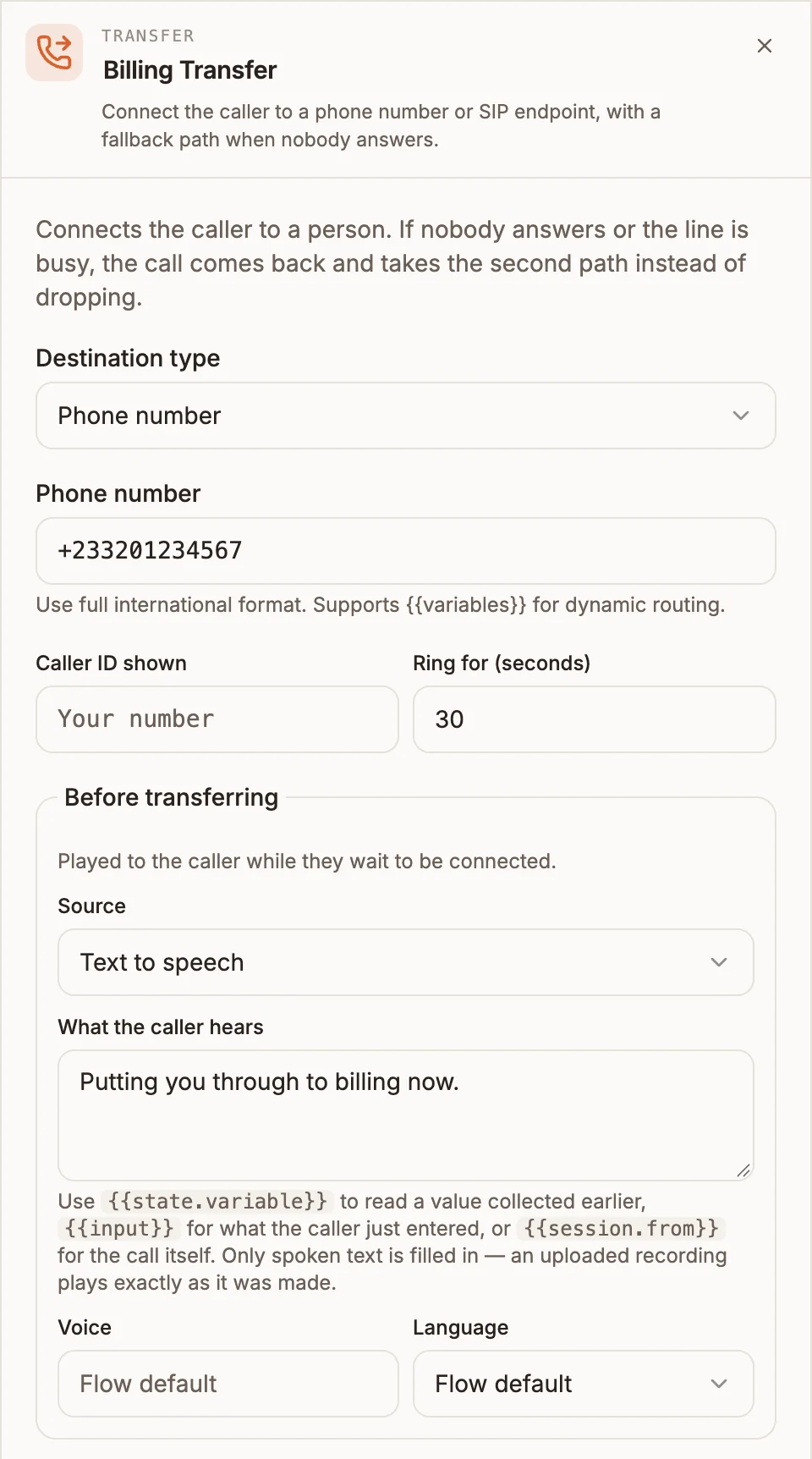
Settings
Prop
Type
With An available agent, only agents with Take phone calls turned on in their Inbox agent settings are considered. If nobody on your team has it on, the panel warns you that the transfer will always take the failure path. See Assignments and routing.
Outputs
| Handle | When it is taken |
|---|---|
| answered | The destination picked up. The caller is now talking to them, not the flow; anything connected here runs only if control returns to the flow after that conversation. |
| no answer / busy | Nobody answered within Ring for (seconds), the line was busy or could not be reached, no agent was free, or the destination was empty. |
Transfer writes nothing to state.
Example
Try a free billing agent, and fall back to voicemail:
Menu ("For billing, press 1.")
  └─ 1 ─→ Transfer (An available agent, Team: Billing, Ring for: 25,
                    Before transferring: "Putting you through to billing now.")
            ├─ answered ─────────→ (caller talks to the agent)
            └─ no answer / busy ─→ Play Message ("Everyone is busy right now.")
                                     → Record (voicemail) → End Call
To try a second agent, connect no answer / busy to another Transfer set to An available agent. An agent who already failed to answer this call is not rung again.
Tips and limits
- Connect no answer / busy. An unanswered transfer is common, and unconnected it ends the call. The canvas warns when it is missing.
- Say something first. Use Before transferring so the caller knows what the ringing means. Several seconds of silence reads as a dropped call.
- Publishing is blocked for a phone number or SIP endpoint when the destination is empty, a SIP URI does not start with
sip:, or a phone number does not look like one. A destination that uses a variable is only checked at call time; if it resolves to nothing, the call takes no answer / busy. - Variables in the announcement need Text to speech. Uploaded audio and audio URLs play exactly as recorded.
- The agent's ringing card shows what the caller already told the flow, such as their Menu (voice) choice.