
Error workflows
Handle failures inside a workflow with failure paths, retries and loop error modes, and start a separate workflow when a run fails.
Some steps fail: an API times out, a provider rejects a message, a record is missing. Buni.ai gives you three places to deal with that, from the most local to the most general:
- Inside the node: retry the call, or route the failure down its own path.
- Inside a loop: decide whether one bad item stops the whole run.
- Across the project: start a separate error workflow whenever a run fails.
Failure paths and retries
The API and Integration nodes have a Failure path, on by default. With it on, the node has two outputs: the normal success path, and a Failure path the run takes when the request fails. Connect the failure path to the nodes that should handle it: log the error to a data store, notify your team, or send the customer a fallback message.
If Failure path is off, or its output is not connected to anything, a failed request fails the run.
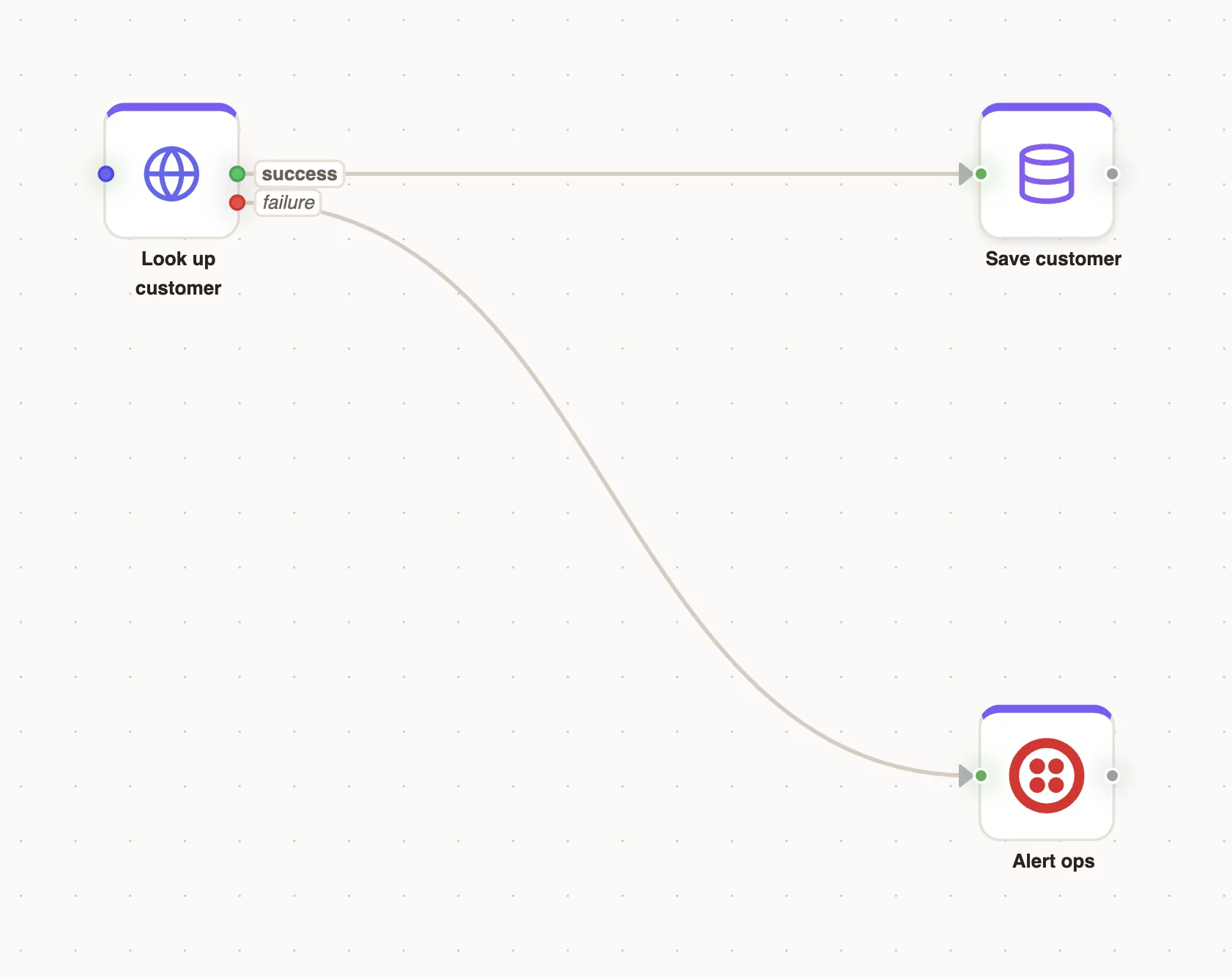
The API node also has a Retry section. Set the number of Attempts, a Strategy (Fixed or Exponential) and a Delay (ms) between attempts. Retry transient errors first; use the failure path for what is left.
Errors inside a loop
A Loop node's If an item fails setting decides what one failed item does to the run:
| Option | Behaviour |
|---|---|
| Stop the whole run | The remaining items are never attempted and the run is marked failed. |
| Skip the item and carry on | The failure is recorded in the results and the run still finishes clean. |
| Carry on, then report | Every item is attempted, and the run reports which ones failed. Best for sending to a list. |
On Error Policy
The standard trigger node's External section has an On Error Policy of ABORT or CONTINUE, stored with each run it starts. To control what the workflow does when a step fails, use the failure paths, retries and loop options on this page.
Error trigger
The Error Trigger starts a workflow when another run in the same project fails. Use it to alert your team or open a ticket, once, for every kind of failure, instead of adding alert nodes to every workflow.
Add the trigger
Drag Error Trigger from the Triggers group onto the canvas of the project whose failures you want to catch. It sits alongside your other triggers.
Choose what it reacts to
Under What it reacts to, set Scope:
- All failures: any failed run in the project.
- Specific triggers: only runs started by the triggers listed in Trigger node ids (comma-separated).
- Trigger types: only runs started by the Trigger sources you pick:
SCHEDULE,WEBHOOK,FORMorMANUAL.
Include test runs is off by default, so failures while you build don't alert anyone.
Build the handler
Connect the nodes that should run on failure, such as a Messaging node that texts your on-call number or an API node that posts to your incident tool.
Publish
Publish the project. Production failures start the published error workflow; test failures start the draft one if Include test runs is on.
What the handler receives
The failure details arrive as input.error:
| Field | Contains |
|---|---|
errorMessage | The error message, with secrets redacted. |
failedInvocationId | The failed run's id, to look it up in the Activity tab. |
failedNodeKey | The node that failed. |
failedTriggerNodeId | The trigger that started the failed run. |
triggerSource | How the failed run started. |
triggerKey | The failed run's trigger key. |
inputSnapshot | The failed run's input, redacted. |
executionTrace | The failed run's step trace, redacted. |
isDryRun | Whether the failed run was a test run. |
failedAt | When the failure was recorded. |
environment | Test or production. |
For example, a message node could send: Workflow failed at {{input.error.failedNodeKey}}: {{input.error.errorMessage}}.
Loop protection
An error workflow never starts another error workflow. If the handler itself fails, that failure is recorded like any other failed run but does not trigger more handlers. An Error trigger also never reacts to its own runs.
Choosing an approach
| You want to | Use |
|---|---|
| Survive a flaky API | Retry on the API node |
| Send a fallback when one call fails | The node's Failure path |
| Keep sending to a list when some recipients fail | Loop Carry on, then report |
| Be told about any failure in the project | An Error Trigger workflow |
Related
Hosted forms
Publish a web form from a Form trigger, share its test and production links, and submit to it from your own page with the public API.
Automation best practices
Build automations that are safe to retry, respect provider rate limits, wait without holding resources and never process the same item twice.