
USSD codes
Connect a USSD short code from your aggregator to a Buni.ai project, and record it on the Routes page.
A USSD short code, such as *789#, is provisioned by a USSD aggregator or a mobile network. Buni.ai does not sell short codes. You keep the code with your aggregator, point its callback at your project, and Buni.ai runs your USSD flow each time someone dials it.
Connecting a short code involves three places:
| Where | What you set | Why |
|---|---|---|
| The project's USSD Provider | Your aggregator | Decides the request and response format Buni.ai speaks. |
| Your aggregator's dashboard | The project's live URL as the callback | Sends dial sessions to Buni.ai. |
| Routes | The short code and its project | Keeps a record of which code answers on which project. |
Set up a short code
Choose the USSD provider
You choose the Provider when you create a USSD project. To change it later, open the project's Settings›General tab and set USSD Provider.
Pick the aggregator that will call the project. Each aggregator sends and expects USSD messages in its own format, and a wrong choice means the aggregator cannot read the replies.
Publish and copy the live URL
Publish the project. On the canvas, open the ⋮ menu and select Copy Live URL. The URL looks like this:
https://<your Buni.ai domain>/api/webhooks/<project token>For aggregators that use a JSON format, the URL ends in ?json=1. Copy it exactly as the app gives it.
Set the callback at your aggregator
In your aggregator's dashboard, open the short code's settings and paste the live URL as its callback URL. The exact screen differs by aggregator; with Africa's Talking, for example, it is the callback URL on the USSD service code.
Record the route
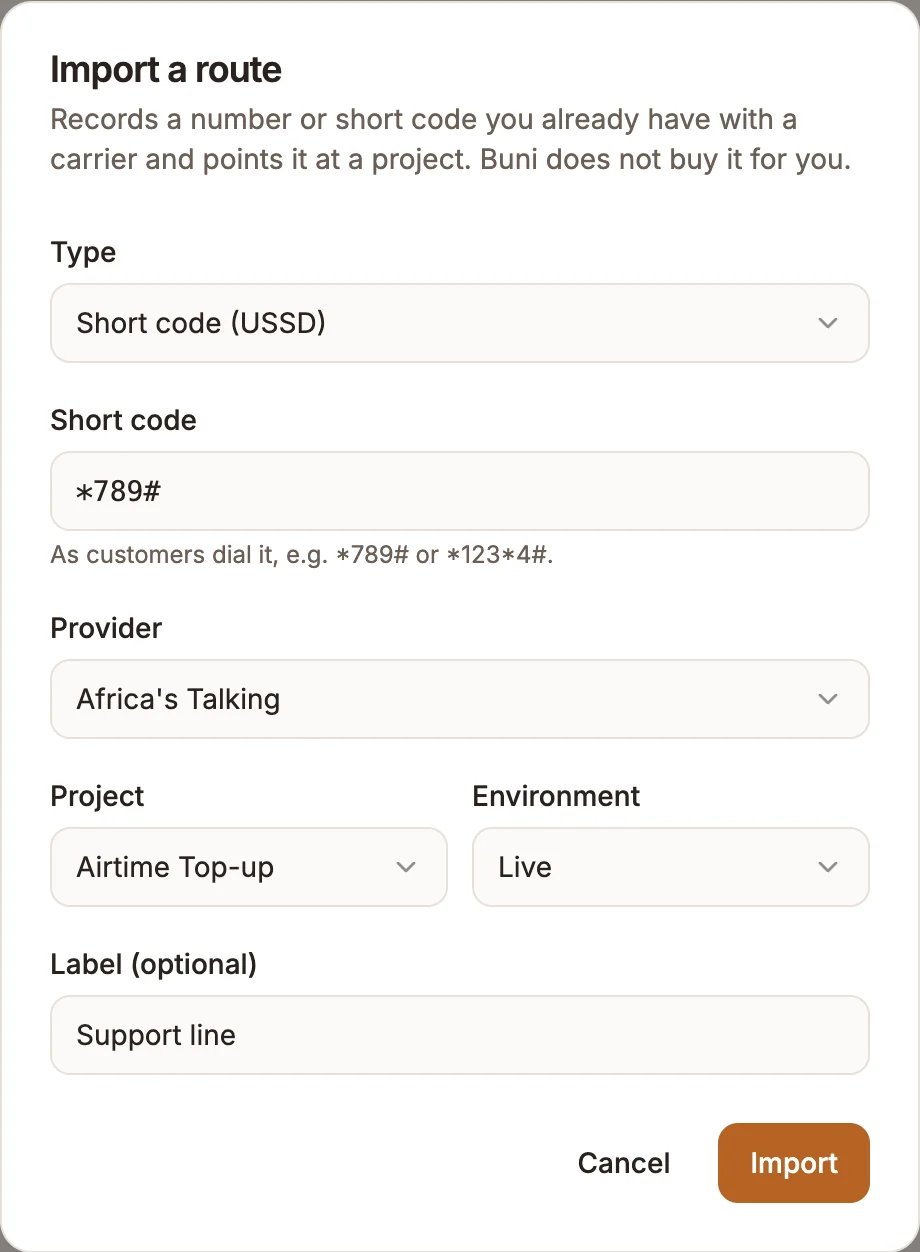
Open Routes from the left sidebar and select Import route. In Import a route:
- Type: Short code (USSD)
- Short code: as customers dial it, for example
*789#or*123*4# - Provider: Africa's Talking, Infobip, Hubtel or Direct carrier
- Project: the USSD project, or Choose later
- Environment: Live or Draft
- Label (optional): a name such as
Support line
Select Import.
Dial it
Dial the short code from a phone on a supported network and check that your first menu appears.
The Routes page
Routes lists every phone number and short code that reaches your workspace, and which project and environment each one answers on. The table shows the Route, Provider, Project, Environment and Status. Change a route's project or environment straight from the table.
For short codes, the route is a record: calls reach the project through the live URL you gave the aggregator, not through the route. Only USSD projects can be chosen for a short code.
To remove a short code, select the trash icon on its row. This removes the record from Buni.ai; it does not release the code at your aggregator.
Testing before you go live
Use the USSD simulator on the canvas to test your draft. The live URL always runs the published version, so publish again after each change you want customers to see.