
Project API settings
The API Access tab of a project - keys, endpoint URLs, the External API switch, default policies, callback URL and managed webhooks.
Each chatbot and automation project has its own API settings under Settings › API Access. Tokens, defaults and limits set here apply to that project only.
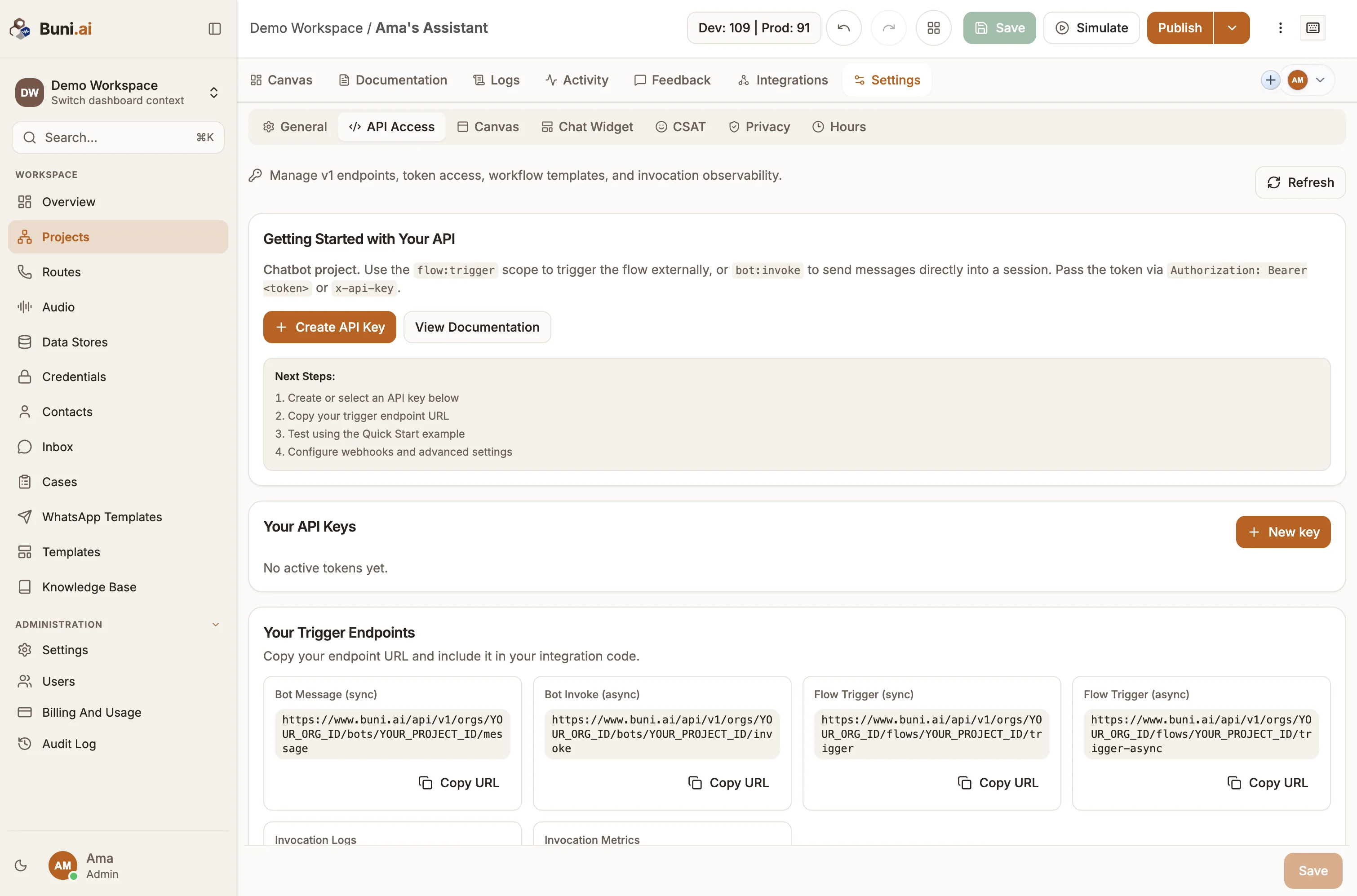
Your API Keys
Lists the project's active tokens with their name, prefix, Last used time and scopes. Use New key to create one and Revoke to delete one. See Authentication.
Your Trigger Endpoints
Ready-to-copy URLs for this project, with your organization ID and project ID filled in. Select Copy URL next to the one you need.
| Label | Endpoint | Shown for |
|---|---|---|
| Bot Message (sync) | POST /bots/{projectId}/message | Chatbot |
| Bot Invoke (async) | POST /bots/{projectId}/invoke | Chatbot |
| Flow Trigger (sync) / (async) | POST /flows/{projectId}/trigger, /trigger-async | Chatbot |
| Automation Trigger (sync) / (async) | POST /automations/{projectId}/trigger, /trigger-async | Automation |
| Invocation Logs, Invocation Metrics | GET /external-invocations/logs, /metrics | Both |
Logs and metrics are dashboard-only
Invocation Logs and Invocation Metrics need a signed-in Buni.ai session; an API token gets no data from them. To check one run from your code, use GET /external-invocations/{invocationId} with the token that started it.
The URLs use the address you opened the app on. Call https://www.buni.ai/... from your integration.
Advanced Settings
Expand Advanced Settings to change the project defaults. Select Save defaults to apply them.
Project Defaults
| Setting | Default | What it does |
|---|---|---|
| Enable External API | On | When off, every token-authenticated call to this project returns 403 External API access is disabled for this project, and queued or scheduled async runs fail when they come up. Tokens stay valid for when you turn it back on. |
| Default enrollment policy | ONE_TIME | Used when neither the request's enrollmentPolicy nor the trigger sets one. ONE_TIME or EVERY_MATCH. |
| Default on-error policy | ABORT | Used when neither the request's onErrorPolicy nor the trigger sets one. ABORT or CONTINUE. |
| Default callback URL | Empty | Where async runs report their result when the request has no webhookUrl. Must be https. See Async runs and callbacks. |
| Default callback secret | Empty | Signs those callbacks. |
| Rate limit / minute | Plan default | Requests each token may make to each endpoint per window. |
| Rate limit window (ms) | Plan default | Length of the rate-limit window. See Rate limits and quotas. |
The policies and callback settings are resolved in this order, first match wins:
- The request body (
enrollmentPolicy,onErrorPolicy,webhookUrl,webhookSecret). - The trigger's own settings. In an automation's Trigger node, the external trigger section has Enrollment Policy, On Error Policy and a Callback Override with Callback URL and Callback Secret.
- The project defaults above.
The chosen policies are recorded on the invocation and passed to the run.
Managed Webhook Subscriptions
Shown once the project is published. Buni.ai creates the webhook in your Stripe, Shopify or GitHub account for you, pointed at this project, instead of you pasting a URL into the provider's dashboard.
| Field | Used for |
|---|---|
| Source | Stripe, Shopify or GitHub. |
| Events (comma separated) | The provider's event names, for example payment_intent.succeeded,invoice.paid or orders/create. |
| Stripe secret key | Stripe only. |
| Shopify store domain, Shopify access token | Shopify only. |
| GitHub token, Repository (owner/repo), Webhook secret (optional) | GitHub only. |
Select Save subscription. The card then shows the subscription's Status, Endpoint, Provider ID and any Failure reason. Revoke subscription removes the webhook from the provider.
Invocation Health, templates and examples
- Invocation Health shows counts of triggered, succeeded and failed runs, the median duration, and the most recent invocations with their status.
- Workflow Template Library stores reusable request payloads at project or organization level. It is managed in the app only.
- Advanced Request Examples builds a sample request (curl, Postman, JavaScript, Node Axios, Python or PHP) from fields such as Trigger key, Enrollment policy, Webhook URL, Delay seconds or Run at, and can send it with a token you paste.
How requests are checked against the trigger
Calls to /flows/.../trigger and /automations/.../trigger (sync and async) are validated against the project's Trigger node before the run starts:
- The external trigger must be enabled on the node.
- If you send
triggerKey, it must equal the node's trigger key (defaultexternal_event). - The payload must contain every top-level key of the node's expected payload (Schema Config on an automation Trigger node).
A request that fails these checks returns 500 with the reasons in error, for example Payload is missing required keys: customerId. Send "dryRun": true first: the response's result.validation lists expectedKeys, actualKeys and missingKeys without running anything. Scheduled runs (runAt or delaySeconds) skip these checks when they fire.
Chatbot flows
A chatbot's Trigger node has no field for the expected payload, so it keeps the default of event and customerId. Include both as top-level fields when you call /flows/{projectId}/trigger, or check with a dry run.